

Cloud accounting is no longer simply a digital replacement for a paper ledger. For a small business, it can become the financial control center that records sales, organizes expenses, reconciles bank activity, prepares reports, and gives an accountant access to current data. That matters because bookkeeping problems usually begin quietly. An uncategorized transaction, duplicated expense, unpaid invoice, or inaccurate sales-tax setting may appear minor in isolation. Repeated across a year, those errors can distort cash-flow decisions and make tax preparation far more difficult. Following consistent practices for effective bookkeeping can help a business maintain accurate records before introducing more advanced accounting automation.
The best SaaS accounting software reduces that administrative burden without taking control away from the business owner. Because the software runs in the cloud, authorized users can work from different devices, collaborate with an accountant, receive product updates, and connect banking or business applications without maintaining a local server. This comparison is for small business owners, freelancers, agencies, consultants, startups, and entrepreneurs choosing a first accounting platform or replacing a system that no longer fits. It compares seven widely known products across usability, accounting depth, invoicing, reporting, automation, integrations, security, support, mobile access, and long-term value.
The short answer is that there is no universal winner. QuickBooks Online offers the broadest all-around small-business ecosystem; Xero is particularly strong for collaboration and integrations; FreshBooks prioritizes service businesses and freelancers; Zoho Books offers exceptional feature-to-price value; Wave provides the strongest free starting point; Sage suits businesses that value established accounting workflows; and Kashoo keeps bookkeeping intentionally simple.
Editorial Disclosure
This comparison was independently researched and prepared using publicly available information and consistent evaluation criteria. The platforms featured did not pay for inclusion or influence their rankings.
Editorial Review Note
Features, plan names, prices, limits, and promotional offers may change. We checked official U.S. product pages on August 4, 2026. Readers should confirm current pricing, included users, payment fees, payroll costs, tax functionality, and regional availability directly with the provider.
Before choosing a platform, test it using your actual accounting workflows, confirm the standard renewal price, and ask your accountant or bookkeeper to review its reporting and compliance capabilities.
Key Takeaways
- QuickBooks Online is the strongest overall option for growing businesses that need advanced reporting, integrations, inventory tools, and payroll add-ons.
- Zoho Books offers the best balance of affordability, automation, inventory management, and accounting features.
- Xero is well suited to collaborative teams that need unlimited users, reliable bank reconciliation, and extensive integrations.
- FreshBooks is a practical choice for freelancers, consultants, and service businesses focused on invoicing, time tracking, and client payments.
- Wave provides the best free starting point for sole proprietors and microbusinesses with basic bookkeeping needs.
- Sage Accounting may suit businesses that prefer traditional accounting workflows, but product availability and pricing differ by country.
- Kashoo keeps bookkeeping simple for very small businesses but offers fewer integrations and advanced features.
- The advertised price does not represent the total cost. Consider payroll charges, user limits, payment fees, integrations, support, and future upgrade requirements before choosing a platform.
Table of Contents
- Quick comparison
- Editor’s top picks
- How we chose these tools
- QuickBooks Online review
- Xero review
- FreshBooks review
- Zoho Books review
- Wave review
- Sage Accounting review
- Kashoo review
- Full feature comparison
- Buying guide
- Frequently asked questions
- Final verdict
At-a-Glance Comparison
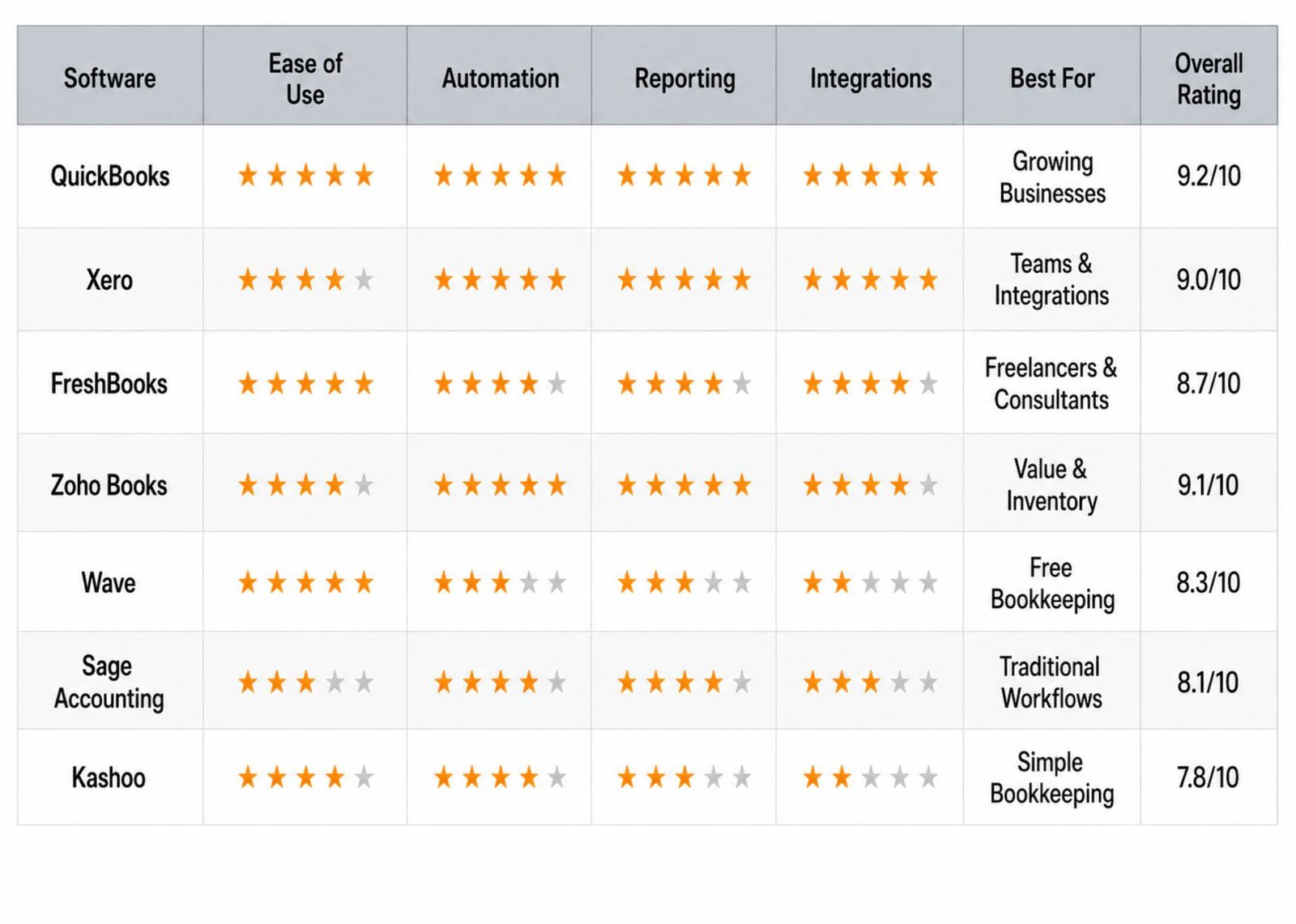
*Standard U.S. monthly list prices are shown where publicly visible. Annual billing, eligibility, country, introductory offers, add-ons, and October 2026 pricing changes may alter the amount paid. FreshBooks advertised Lite at $23 per month and a 30-day trial when reviewed. Wave listed Starter at $0 and Pro at $19 monthly or $190 annually. Kashoo’s official search listing showed $30 monthly, although parts of its pricing interface rendered inconsistently during review.
Editor’s Top Picks
Best overall: QuickBooks Online
QuickBooks Online combines mainstream accountant familiarity, capable reporting, bank reconciliation, invoicing, payroll options, inventory on Plus, and a large integration ecosystem. Its breadth makes it the safest shortlist choice for many U.S. small businesses, although price increases and add-ons can make the total cost substantial.
Best value: Zoho Books
Zoho Books places unusually broad automation, sales, purchase, tax, reporting, and inventory functions within accessible plans. It is especially compelling for companies already using Zoho applications. The main qualification is that features and tax tools differ by edition and country.
Best for freelancers: FreshBooks
FreshBooks makes client billing, time tracking, proposals, expenses, retainers, and project profitability easier to understand than many accountant-first platforms. Its client limits and paid additional users require attention as the business grows.
Best for startups: Xero
Xero works well for founders who expect to collaborate with employees, bookkeepers, and a changing application stack. Its interface, unlimited-user approach on core plans, app marketplace, and scalable reporting are valuable, but the Early plan’s transaction limits can become restrictive quickly.
Best free option: Wave
Wave Starter offers unlimited invoicing and basic bookkeeping without a subscription. It is an excellent entry point for a solo service provider with straightforward U.S. or Canadian needs. Businesses requiring advanced inventory, extensive reporting, multiple currencies, or a wide app ecosystem should look elsewhere.
Best for growing businesses: QuickBooks Online
QuickBooks Online can progress from basic income-and-expense tracking to bills, projects, inventory, budgets, customized permissions, advanced reporting, and payroll. Growth comes with higher subscription and add-on costs, so businesses should model the three-year cost rather than compare entry prices alone.
Best for inventory management: Zoho Books
Zoho Books is our inventory-oriented pick for smaller companies because higher editions connect accounting with items, purchase orders, sales orders, warehouses, and related Zoho inventory tools. QuickBooks Online Plus is the more familiar alternative for businesses needing basic inventory costing within a U.S.-centric accounting ecosystem.
How We Chose the Best SaaS Accounting Software
We evaluated the products for commercial suitability rather than rewarding the longest feature list. A capability received credit only when it helped a real small-business workflow and its availability could be supported by current vendor information.
Our scoring model used the following weighted criteria:
| Criterion | Weight | What we assessed |
| Core accounting and reporting | 20% | Double-entry records, reconciliation, chart of accounts, financial statements, auditability, and reporting depth |
| Ease of use | 15% | Setup, navigation, terminology, transaction entry, reconciliation, and learning resources |
| Pricing and value | 15% | Standard price, usable entry tier, user limits, add-ons, payment fees, and upgrade costs |
| Automation and AI | 10% | Bank rules, matching, categorization, reminders, receipt capture, forecasts, anomaly detection, and responsible human review |
| Invoicing and business workflows | 10% | Estimates, invoices, recurring billing, bills, projects, inventory, sales tax, and payments |
| Integrations | 10% | Banking connections, payroll, ecommerce, payments, CRM, time tracking, and app-marketplace depth |
| Security and controls | 8% | Encryption claims, multifactor authentication, permissions, backups, audit trail, and security transparency |
| Scalability | 5% | Users, entities, transaction volume, advanced editions, and migration path |
| Support and onboarding | 4% | Support channels, service hours, onboarding, community, and premium support conditions |
| Mobile experience | 3% | Useful financial work available on iOS and Android, not merely the existence of an app |
Ratings are editorial assessments, not laboratory certifications or aggregated customer-review scores. Public customer feedback informed questions about usability and support, but vendor-controlled testimonials did not determine the rankings. We also distinguished conventional automation from generative or agentic AI. Automatically matching a bank transaction is valuable, but it should not be labeled advanced AI without evidence.
1. QuickBooks Online: Best Overall
Overview
QuickBooks Online is Intuit’s cloud accounting platform for small businesses. It covers invoicing, expenses, bank feeds, tax categories, reports, and payment acceptance, then adds bills, time, inventory, projects, budgets, permissions, and forecasting as customers move through higher plans.
Its primary advantage is ecosystem depth. Many U.S. bookkeepers and accountants understand QuickBooks, and the platform connects with hundreds of business applications. Intuit is also expanding plan-dependent AI agents for accounting, payments, tax, payroll, customers, finance, and projects.
Best For
QuickBooks Online is best for U.S. small businesses that want one widely supported platform and expect their accounting needs to become more complex. Plus is particularly relevant to businesses needing inventory and project profitability. Advanced suits larger teams that require custom permissions, deeper reporting, workflows, and forecasts.
Key Features
- Bank and credit-card transaction feeds with categorization and matching
- Estimates, invoices, online payment options, reminders, and receipt capture
- Profit and loss, balance sheet, cash-flow, tax, receivable, and payable reports
- Bill management and time tracking on appropriate plans
- Inventory and project profitability on Plus
- Custom access, workflow automation, forecasting, and premium support on Advanced
- Optional payroll, bookkeeping, tax, payments, and workforce services
- Hundreds of third-party integrations
Pros
- Broad accounting feature set with a clear upgrade path
- Familiar to a large network of U.S. accounting professionals
- Strong reporting and tax-oriented workflows
- Large integration ecosystem
- Useful mobile tools on eligible paid plans
- Rapidly developing AI-assisted accounting and financial insights
Cons
- Standard prices are higher than several competitors
- Payroll, payments, expert bookkeeping, extra capabilities, and transaction fees can increase total cost
- The number of users and advanced features depends on plan
- Interface breadth can overwhelm a first-time bookkeeper
- AI features are plan- and product-dependent and still require review
Pricing
QuickBooks uses multiple paid editions, including Simple Start, Essentials, Plus, and Advanced, while its current site also describes newer Lite or Free offerings with restrictions. Standard U.S. list prices and promotions change regularly; at review, Simple Start was $38 per month, Plus was $115 per month, and Advanced was $275 per month before temporary discounts. A 30-day trial is commonly available as an alternative to the introductory discount, not necessarily in combination with it.
Compare the checkout page rather than the banner price. Confirm the regular renewal rate, users, payroll base and employee fees, payment charges, and whether the feature you need is included in that exact edition.
Ease of Use
Setup is guided, and connecting a bank can populate the transaction-review workflow quickly. Everyday invoicing and expense tasks are accessible, but correct configuration of opening balances, sales tax, chart-of-account mappings, and inventory requires care. The interface becomes denser as more Intuit services are activated.
Integrations
QuickBooks has one of the strongest ecosystems in this comparison. It supports connections across ecommerce, CRM, payroll, payments, time tracking, receipt capture, reporting, and inventory. Intuit says its broader Online offering supports hundreds of integrations; availability can differ for Free and entry editions.
Automation & AI Features
Bank rules, recurring transactions, invoice reminders, matching, and receipt capture reduce routine entry. Intuit AI goes further by suggesting categorization and reconciliation actions, surfacing insights, detecting anomalies, and supporting specialized workflows. Intuit states that access varies by subscription. Treat recommendations as drafts: the owner or accountant remains responsible for the books.
Reporting & Analytics
QuickBooks provides the core financial statements plus operational, sales, expense, receivable, payable, and tax reports. Plus adds project and inventory visibility; Advanced offers more customized KPI, forecasting, and reporting functions. This breadth is a major reason to choose it over invoice-first software.
Mobile Experience
Eligible paid plans include mobile access for invoicing, receipts, expenses, mileage, and financial monitoring. Intuit notes that mobile access and third-party integrations are not currently included with QuickBooks Free, an important distinction when comparing zero-cost editions.
Security
QuickBooks Online uses cloud access, backups, account controls, and secure authentication features. Businesses should enforce multifactor authentication, restrict user permissions, review connected apps, and remove former staff promptly. Advanced provides more granular roles than entry editions.
Customer Support
Phone support is included with active Simple Start plans and above, according to the current U.S. pricing page. Help articles, tutorials, community discussions, onboarding resources, and optional paid expert services expand the support model. Advanced includes Priority Circle premium support and training.
Limitations
QuickBooks can become expensive before a business reaches midmarket size. Multi-entity consolidation, highly advanced inventory, manufacturing, or complex international requirements may require third-party applications or a different ERP-class platform.
Editor’s Verdict
Choose QuickBooks Online when accountant availability, U.S. tax workflows, integrations, and a long upgrade path matter more than the lowest subscription price. It is the strongest all-rounder here, but buyers should budget for the plan they will need in two years—not the discounted plan displayed today.
Overall rating: 9.2/10
2. Xero: Best for Collaboration and Integrations
Overview
Xero is a cloud-native accounting platform known for a clean interface, unlimited users on its core U.S. plans, bank reconciliation, and a large app marketplace. Its Early, Growing, and Established editions add capacity and advanced functions progressively.
Xero is especially effective when the owner, internal team, external bookkeeper, and accountant need to work from the same current ledger without paying for every additional seat.
Best For
Xero suits startups, agencies, retail businesses, and growing teams that prioritize collaboration, bank reconciliation, and integrations. Established is the relevant tier for companies needing multiple currencies, project tracking, employee expenses, and deeper analytics.
Key Features
- Online invoicing, quotes, bills, bank feeds, reconciliation, and contacts
- Inventory item tracking, with Inventory Plus available separately on eligible plans
- Hubdoc capture and storage functionality
- Cash-flow views, financial statements, and visual analytics
- Project tracking, expenses, and multi-currency on Established
- Unlimited users on standard business plans
- App marketplace spanning ecommerce, payroll, CRM, payments, and reporting
- JAX conversational financial assistance and smart automation as available
Pros
- Unlimited users encourage collaboration
- Strong reconciliation workflow and accountant access
- Extensive third-party app ecosystem
- Clean, consistent interface
- 24/7 online support and first-90-day onboarding resources
- Good upgrade path for project, expense, and multi-currency requirements
Cons
- Early limits invoices and bills, making the cheapest tier easy to outgrow
- No permanent free plan
- Payroll is not a universally built-in U.S. feature and may require an integration
- Telephone support is not positioned like traditional inbound phone support
- Some inventory, analytics, and AI capabilities depend on plan or add-on
- U.S. prices are scheduled to rise on October 1, 2026
Pricing
At the August 2026 review date, Early started at $25 per month in the United States before temporary discounts. Xero explicitly states that U.S. subscription prices will increase on October 1, 2026. It offers a 30-day trial, and the site may alternatively display a promotional first month or introductory discount. Compare the post-promotion renewal price.
Ease of Use
The dashboard, bank reconciliation, and invoicing workflows are logically organized. Non-accountants still need to understand reconciliation and account coding, but Xero generally exposes fewer distracting upsells than some larger ecosystems. The Early plan’s usage limits must be monitored.
Integrations
Integrations are a defining strength. Xero’s app marketplace covers payments, ecommerce, inventory, reporting, payroll, expense management, and CRM. This makes the platform flexible, but every added app can create another subscription, data flow, and security relationship to manage.
Automation & AI Features
Xero supports bank rules, suggested matches, automated reminders, recurring invoices, data capture, and cash-flow tools. JAX is positioned as an AI financial assistant, although rollout, eligible plans, data access, and regional availability should be checked. AI-generated answers should be reconciled against underlying reports.
Reporting & Analytics
All plans provide accounting reports, while higher tiers add richer analytics, project views, and longer cash-flow horizons. Xero’s acquisition and integration of analytics capabilities has strengthened visual performance monitoring. Complex management reporting may still require configuration or a specialist app.
Mobile Experience
Xero Accounting supports invoices, quotes, receipts, expenses, bank reconciliation, cash-flow visibility, and contact information on mobile. Separate functionality may exist for expenses or projects. Verify that the exact mobile workflow your field team needs is supported.
Security
Xero publishes information on data protection and authentication and supports multifactor authentication. Administrators should apply least-privilege access, examine app permissions, and review user activity. Unlimited users should not mean unlimited access rights.
Customer Support
Xero offers 24/7 online support through its support system, plus knowledge resources and onboarding assistance during the first 90 days. Buyers who require an immediate inbound phone line should test the escalation process during the trial.
Limitations
The cheapest tier is deliberately limited. Advanced stock control, consolidated multi-entity accounting, complex payroll, and industry-specific workflows commonly require apps or a more specialized platform.
Editor’s Verdict
Xero is the best alternative to QuickBooks Online for collaborative, integration-heavy businesses. Choose Growing or Established based on operational requirements rather than selecting Early solely for price. Recheck the announced October 2026 price increase before publication or purchase.
Overall rating: 9.0/10
3. FreshBooks: Best for Freelancers and Service Businesses
Overview
FreshBooks began with invoicing and remains designed around the relationship between a service provider, project, time entry, expense, and client payment. It now supports double-entry accounting and financial reports, but the experience remains more approachable for a consultant than for an inventory accountant.
Best For
FreshBooks is best for freelancers, consultants, creative agencies, contractors, and other service businesses that bill clients for time, projects, retainers, or fixed-fee work.
Key Features
- Custom invoices, estimates, proposals, retainers, and online payments
- Time tracking and billable expenses
- Expense capture and receipt scanning on eligible plans
- Project collaboration and profitability
- Client portal and automated payment reminders
- Tax-time and core accounting reports
- Optional payroll and additional team members
- Mobile invoicing, expenses, mileage, and time tracking
Pros
- Excellent invoice and client experience
- Easy time-to-invoice workflow
- Useful proposals, retainers, projects, and profitability tools
- Beginner-friendly design
- 30-day trial and 30-day money-back guarantee were advertised at review
- Accountant access on Plus and above
Cons
- Lite supports only five billable clients; Plus supports 50
- Additional team members cost extra
- Standard accounting and inventory depth trails QuickBooks, Xero, and Zoho Books
- Payroll and advanced payments add cost
- Businesses with high transaction complexity can outgrow it
Pricing
FreshBooks listed standard monthly prices of $23 for Lite, $43 for Plus, and $70 for Premium when checked, before temporary discounts. Extra team members were $11 each per month; U.S. payroll was listed from $40 per month plus $6 per user. A 30-day free trial was available.
Ease of Use
FreshBooks is among the easiest products here for turning work into an invoice. Language is client- and project-oriented rather than heavily accounting-oriented. That simplicity benefits owners, although accountants may need to configure the ledger and reports carefully.
Integrations
FreshBooks integrates with payment, payroll, scheduling, CRM, ecommerce, and productivity tools. Its marketplace is useful but not as extensive as QuickBooks or Xero. Check whether two-way data sync covers the specific records needed.
Automation & AI Features
Recurring invoices, reminders, expense imports, receipt scanning, and payment workflows reduce manual administration. FreshBooks’ value comes more from practical automation than from the broad agentic-AI positioning seen at Intuit or Xero. Buyers should not select it solely for AI.
Reporting & Analytics
Plus and higher plans include accounting and financial reports; Premium adds project profitability and more advanced receipt capture. The reporting is sufficient for many service businesses but less customizable than accountant-centric alternatives.
Mobile Experience
The mobile app supports invoices, expenses, time, mileage, and client communication, making it well suited to contractors and consultants. Some desktop reports and settings remain better handled in a browser.
Security
FreshBooks provides cloud security controls and secure payment connections. Users should enable multifactor authentication, avoid sharing accounts, and give accountants separate access. Payment data is also governed by the connected processor’s controls.
Customer Support
FreshBooks is known for accessible support resources, with phone and email options varying by plan and location. Select includes dedicated phone support. Test response quality with a migration or reporting question during the trial.
Limitations
Client caps distort the apparently low entry price. A freelancer with six active billable clients needs Plus, while a team may pay separately for each member. Inventory-based, multi-entity, or complex tax operations should favor another product.
Editor’s Verdict
FreshBooks is the most natural choice when earning, recording time, billing, and collecting from clients define the business. It is not the cheapest once client and user limits are considered, but it can reduce billing friction more effectively than a heavier general ledger.
Overall rating: 8.7/10
4. Zoho Books: Best Value for Feature-Rich Accounting
Overview
Zoho Books is a cloud accounting platform within the wider Zoho business suite. It covers receivables, payables, banking, sales tax, inventory-related workflows, projects, automation, reporting, and collaboration. Its value is strongest for organizations that want accounting connected to Zoho CRM, Expense, Inventory, Analytics, Commerce, or Payroll where supported.
Best For
Zoho Books suits startups, agencies, ecommerce businesses, and growing small companies that want broad functionality at a competitive cost. It is also a strong choice for businesses operating in markets where Zoho provides localized tax editions.
Key Features
- Quotes, invoices, recurring billing, payment reminders, and customer portal
- Bills, purchase orders, expenses, bank feeds, and reconciliation
- Sales-tax or localized tax tools depending on country edition
- Projects, time tracking, budgets, and reporting
- Items, inventory adjustments, sales orders, purchase workflows, and warehouses on eligible tiers
- Workflow rules, webhooks, custom functions, and approvals
- Zia search and assistance, plus anomaly and data-entry automation where available
- Mobile apps and connections across the Zoho ecosystem
Pros
- Excellent feature-to-price ratio
- Genuine free plan for eligible small businesses in supported markets
- Strong workflow automation and customization
- Broad Zoho ecosystem
- Capable inventory and order workflows on higher plans
- Customer and vendor portals
Cons
- Plan structure and features vary significantly by country
- Payroll availability is regional
- Advanced inventory and analytics may require higher tiers or other Zoho products
- Large feature set increases configuration complexity
- Third-party marketplace is smaller than QuickBooks or Xero
Pricing
Zoho Books offers a free plan subject to revenue and feature limits, followed by paid editions such as Standard, Professional, Premium, Elite, and Ultimate in many markets. Prices, users, transaction limits, and included features differ by country and billing cycle. Because the official pricing page localizes dynamically, buyers should select their business country before comparing.
Ease of Use
Core invoicing and expenses are approachable. The challenge is not basic navigation but the number of modules and settings available. A structured setup of taxes, opening balances, templates, roles, workflows, and integrations prevents later inconsistencies.
Integrations
Zoho Books integrates naturally with Zoho’s CRM, expense, inventory, analytics, subscription, commerce, and workplace tools. It also supports payment gateways, banks, and third-party extensions. It is most compelling when the business wants a unified Zoho stack rather than disconnected apps.
Automation & AI Features
Workflow rules can trigger emails, field updates, webhooks, and custom functions. Recurring transactions, bank rules, reminders, document capture, and approvals automate routine work. Zia supports contextual search and assistance, but AI features vary by edition and rollout. The configurable automation layer is more important than the AI label.
Reporting & Analytics
Zoho Books includes financial statements, receivable and payable reports, sales and purchase reports, tax reports, projects, budgets, and inventory reporting where eligible. Advanced cross-application analysis is stronger with Zoho Analytics or higher plans.
Mobile Experience
Zoho Books provides capable iOS and Android apps for invoices, expenses, time, reports, and approvals. It is one of the more complete mobile offerings, though advanced configuration remains a desktop task.
Security
Zoho provides role-based access, audit trails, encryption and account-security options across its cloud products. Administrators should enforce multifactor authentication, assign module-level roles carefully, and separate approval from payment authority where the plan permits.
Customer Support
Support channels depend on plan and country and may include email, voice, chat, documentation, webinars, and community resources. Organizations requiring rapid telephone support should verify hours and entitlement for the selected edition.
Limitations
The free plan is not a permanent answer for every growing company. Revenue, user, location, workflow, or feature limits can force an upgrade. Organizations also need to confirm that local tax filing, bank feeds, payroll, and payment gateways are supported in their country.
Editor’s Verdict
Zoho Books provides the best overall value in this comparison. It rewards owners willing to configure workflows and potentially adopt more of the Zoho suite. Verify local pricing and compliance first; if the regional edition fits, it can replace several separate tools.
Overall rating: 9.1/10
5. Wave: Best Free Option
Overview
Wave serves freelancers and microbusinesses with a Starter plan that includes unlimited invoices, estimates, bills, and bookkeeping records. Its Pro plan adds automated bank imports, merging and categorization, receipt capture, reminders, and lower payment pricing under stated conditions.
Best For
Wave is best for U.S. and Canadian solo businesses with simple income, expenses, and invoicing. It is particularly attractive when paying a monthly accounting subscription would be disproportionate to transaction volume.
Key Features
- Unlimited invoices, estimates, bills, and bookkeeping records on Starter
- Customer and cash-flow dashboard
- Online payment options with transaction fees
- Bank imports and automated categorization on Pro
- Unlimited digital receipt capture on Pro
- Automated late-payment reminders on Pro
- Optional payroll and Wave Advisors services where available
- Mobile invoicing
Pros
- Useful permanent free plan
- Unlimited invoicing rather than a low client cap
- Straightforward setup for service businesses
- Affordable Pro tier
- Optional bookkeeping assistance
- Clear separation between basic free use and automation upgrades
Cons
- Primarily focused on the United States and Canada
- Limited inventory, multicurrency, advanced reporting, and integrations
- Important automation and receipt functions require Pro
- Support depth differs by plan
- Not ideal for complex businesses or international expansion
Pricing
Wave Starter was free when reviewed. Pro cost $19 per month or $190 annually, before temporary promotions. Online payment, payroll, and advisor services carry separate fees. Wave Advisors started at $149 per month on the official pricing page, subject to service package.
Ease of Use
Wave minimizes accounting complexity and works well for recording straightforward sales and expenses. Free users may need to import or enter more data manually. Owners still need to reconcile accounts and inspect categories rather than assuming the dashboard is tax-ready.
Integrations
Wave has a narrower integration environment than QuickBooks, Xero, or Zoho. Businesses needing deep ecommerce, inventory, CRM, or reporting connections should map those requirements before choosing the free price.
Automation & AI Features
Pro automatically imports, merges, and categorizes bank transactions and captures receipts. These are useful machine-assisted workflows, but Wave is not the leader for conversational or agentic financial AI. Its strongest argument is focused automation at a modest price.
Reporting & Analytics
Wave covers core bookkeeping and financial reports suitable for many microbusinesses. It lacks the breadth of customized management reporting, project profitability, inventory analysis, and departmental tracking found in higher-end competitors.
Mobile Experience
The mobile experience supports invoicing and selected financial tasks. Receipt capture and some automation are plan-dependent. Businesses that operate primarily from phones should test every required workflow before committing.
Security
As with all financial SaaS, users should enable the strongest authentication available, protect the connected email account, monitor bank connections, and review payment permissions. Payment processing introduces separate fee and risk considerations.
Customer Support
Support access depends on the plan and service. Pro and paid advisory services provide a stronger help path than Starter. Free users should expect to rely more heavily on documentation and automated resources.
Limitations
Wave’s free plan solves bookkeeping and invoicing, not every finance operation. Inventory, sophisticated access controls, multi-entity consolidation, international tax, and a large app marketplace are outside its core strength.
Editor’s Verdict
Wave is the best free accounting software here for a straightforward microbusiness. Upgrade to Pro if bank automation and receipts save meaningful time. Move to QuickBooks, Xero, or Zoho Books before complexity—not merely revenue—makes Wave restrictive.
Overall rating: 8.3/10
6. Sage Accounting: Best for Traditional Accounting Workflows
Overview
Sage is an established accounting software vendor with products ranging from small-business accounting and Sage 50 to Sage Intacct. The exact entry-level cloud product, plan name, price, and availability vary substantially by country. In the United States, Sage’s current positioning emphasizes Sage 50 for small businesses and Sage Intacct for scaling organizations more heavily than entry-level Sage Accounting.
Best For
Sage Accounting is best considered by owners who value conventional accounting processes, established vendor experience, and a possible future route into other Sage products. It may also suit businesses whose accountant already supports the appropriate regional Sage edition.
Key Features
- Sales invoices, expense and bill recording, and bank reconciliation in supported editions
- Cash-flow views and standard financial statements
- Contacts, products and services, tax settings, and accountant collaboration
- Mobile access in supported regions
- Connections to payments, payroll, and related Sage products depending on market
- Broader automation and AI capabilities in higher-end Sage products
Pros
- Long accounting-software heritage
- Familiar structure for finance-oriented users
- Regional products can provide localized accounting and tax workflows
- Potential path to Sage 50 or Sage Intacct as complexity grows
- Established partner and accountant community in several markets
Cons
- Product names, availability, and pricing are inconsistent across countries
- U.S. buyers may not find the same entry cloud plan described in UK or Canadian reviews
- Integration ecosystem is less straightforward than QuickBooks or Xero at this level
- Advanced Sage AI messaging primarily concerns Sage Intacct, not necessarily Sage Accounting
- Mobile and support entitlements require regional verification
Pricing
Pricing cannot be represented responsibly with one global figure. Buyers must use their country-specific Sage site and confirm whether the product being sold is Sage Accounting, Sage 50, or another edition. Do not use a UK price to budget a U.S. deployment. The current U.S. website may route a growing business toward quote-based or higher-cost products.
Ease of Use
Sage’s accounting logic will feel natural to bookkeepers. First-time owners may find it more formal than invoice-first tools. The setup should be completed with the correct business type, tax basis, chart of accounts, opening balances, and bank feeds.
Integrations
Connections differ by product and region. Sage has marketplaces and partner ecosystems, but buyers should confirm the exact integration against the exact Sage product—not assume that an integration advertised for Sage Intacct or Sage 50 works with Sage Accounting.
Automation & AI Features
Bank matching, recurring transactions, and data capture can reduce manual work in supported small-business editions. Sage’s most advanced finance AI agents, auditable answers, and close or accounts-payable automation are associated with Sage Intacct. It would be misleading to assign all of those functions to the entry product.
Reporting & Analytics
Core accounting reports are a Sage strength, but customization and dashboards depend on edition. Businesses needing multi-entity consolidation, advanced dimensions, or close management should evaluate Sage Intacct rather than stretching an entry plan.
Mobile Experience
Mobile availability and functionality differ by country and edition. Confirm whether the app supports invoicing, receipts, contacts, bank tasks, and reports on the devices your staff use.
Security
Sage publishes trust and security information at company and product levels. The buyer should verify encryption, authentication, data location, backup, audit, and permissions for the contracted product rather than relying on group-level claims.
Customer Support
Support can include documentation, community, partners, and direct product support. Entitlement, channel, and hours vary by product and subscription. Local accountant familiarity may be as important as vendor support.
Limitations
Regional fragmentation is the decisive limitation for a global comparison. Sage may be an excellent local fit, but it is harder to recommend without knowing the buyer’s country, target product, and accountant ecosystem.
Editor’s Verdict
Shortlist Sage when an accountant recommends a specific locally supported edition or when the business wants an established accounting path toward Sage 50 or Intacct. U.S. microbusinesses seeking transparent self-service pricing will usually find Wave, Zoho Books, Xero, FreshBooks, or QuickBooks easier to compare.
Overall rating: 8.1/10
7. Kashoo: Best for Simple Bookkeeping
Overview
Kashoo is built around uncomplicated double-entry bookkeeping for very small businesses. It combines bank connections, income and expense tracking, invoicing, payments, sales tax, multi-currency, reports, and unlimited users. Its related TrulySmall product emphasizes automated posting and receipt capture.
Best For
Kashoo suits sole proprietors, consultants, and owner-operated businesses that want a clean ledger without the modules and upsells of a broader financial suite.
Key Features
- Double-entry ledger and core financial reports
- Bank feeds across thousands of financial institutions
- Income, expense, and sales-tax tracking
- Invoices and Stripe payment connection
- Multi-currency support
- Unlimited users with access levels
- Payroll integration
- Automated posting, categorization, and smart receipts through related offerings
Pros
- Purposefully simple interface
- Unlimited users at no extra charge
- Core double-entry accounting rather than invoice-only records
- Multi-currency support
- 14-day trial without a credit card
- Phone, chat, email, and setup-call support are described by the vendor
Cons
- Smaller integration ecosystem
- Limited advanced inventory, projects, customization, and analytics
- Website pricing presentation was inconsistent during review
- Mobile support appears more iOS-oriented; Android users should verify current availability
- Smaller market and adviser ecosystem than major competitors
Pricing
Kashoo’s official search listing stated $30 per month and a 14-day free trial, while the interactive pricing area rendered a conflicting $0 value during review. The vendor says prices are in U.S. dollars. Because of that inconsistency, buyers should obtain the final renewal price directly before entering payment details.
Ease of Use
Simplicity is the core product decision. Owners can connect accounts, review transactions, create invoices, and run essential reports without configuring a large operational suite. Very small businesses can also benefit from improving accounting results through bookkeeping before adopting more complicated reporting and automation tools. However, Kashoo’s simplicity also limits specialized workflows.
Integrations
Kashoo connects with banks, Stripe, Square, and payroll-related tools, but its ecosystem is not comparable with QuickBooks or Xero. Verify every required connection and export format before migrating.
Automation & AI Features
Kashoo and TrulySmall promote automated posting and categorization plus smart receipt scanning. These functions can reduce data entry, but the product does not currently present the breadth of conversational financial AI offered by larger vendors.
Reporting & Analytics
The platform supplies the core reports a very small business and its accountant need. Businesses requiring detailed budgets, departments, project profitability, complex inventory, or board reporting may outgrow it.
Mobile Experience
Kashoo has historically emphasized iPhone and iPad access. Android-dependent teams should verify present app availability and feature parity. Browser access remains central.
Security
Kashoo states that it uses 256-bit SSL encryption, protects against unauthorized access, backs data up daily, and permits customers to take their data when leaving. Users should still enable strong authentication and control roles carefully.
Customer Support
The vendor lists phone, chat, and email support and offers a scheduled 30-minute setup call. That direct assistance is a strength for a smaller product, though hours and response targets should be confirmed.
Limitations
Kashoo is unlikely to be the final system for a fast-growing inventory, ecommerce, or multi-entity company. Its value lies in doing essential accounting without unnecessary complexity.
Editor’s Verdict
Kashoo is a sensible niche choice for owners who find mainstream platforms excessive. Confirm pricing and mobile compatibility first. If the business expects complex inventory, many integrations, or sophisticated management reporting, start with a more scalable product.
Overall rating: 7.8/10
Feature Comparison Table
| Software | Starting Price | Free Plan | Payroll | Inventory | AI & Automation |
|---|---|---|---|---|---|
| QuickBooks Online | $38/month | Limited | Paid add-on | Plus plan | Advanced |
| Xero | $25/month* | No | Via partners | Basic/add-on | Advanced |
| FreshBooks | $23/month | No | Paid add-on | Limited | Moderate |
| Zoho Books | Free plan | Yes | Regional | Strong | Advanced |
| Wave | $0 | Yes | Paid service | Limited | Basic |
| Sage Accounting | Region-based | Usually no | Regional | Plan-based | Moderate |
| Kashoo | About $30/month | No | Integration | Limited | Basic |
How to Choose SaaS Accounting Software

What is SaaS accounting software?
SaaS accounting software is an application hosted by the vendor and accessed through a web browser or mobile app. The customer normally pays a recurring subscription, while the vendor maintains the core infrastructure and releases updates. Data can synchronize across authorized users and connected services.
Cloud access does not remove the need for accounting controls. The business remains responsible for accurate records, tax treatment, user access, approvals, backups or exports, and professional advice. The IRS advises businesses to maintain a suitable business recordkeeping system that clearly documents income and expenses.
Key benefits
The main benefits are current data, remote collaboration, automatic updates, bank connectivity, workflow automation, and easier integration. A bookkeeper can review the same ledger as the owner without exchanging multiple spreadsheet versions. Automated matching and reminders can shorten routine work, while dashboards make cash position easier to monitor.
Who should use it?
SaaS accounting software is appropriate for most businesses that issue invoices, incur expenses, maintain a bank account, collect sales tax, work with an accountant, or need reliable financial statements. It is particularly useful for distributed teams and owners who need access outside an office. Companies without sufficient internal expertise may also consider professional accounting services to support bookkeeping, reporting, compliance, and financial planning.
Who may not need it?
A pre-revenue hobby project with almost no transactions may use a carefully maintained spreadsheet temporarily. A highly regulated, complex, or large multi-entity organization may need an ERP rather than small-business SaaS. Businesses with unreliable internet or strict offline requirements should examine desktop or hybrid options.
Essential features to evaluate
Start with operational requirements rather than AI claims. Selecting the right accounting software modules can prevent a business from paying for unnecessary capabilities while ensuring its essential workflows remain covered. Most small businesses need the following core features:
- Double-entry accounting and a configurable chart of accounts
- Reliable bank feeds, rules, matching, and reconciliation
- Invoices, estimates, bills, expenses, credits, and recurring transactions
- Profit and loss, balance sheet, cash-flow, receivable, and payable reports
- Sales-tax handling appropriate to the business location
- Accountant access, user roles, audit history, and exports
- Receipt capture and document attachment
- Integrations for payroll, payments, ecommerce, CRM, or time tracking
- Inventory, projects, multicurrency, or departments if operations require them
Pricing considerations
Do not compare only the lowest banner price. Calculate the likely annual cost after promotions, including additional users, payroll, payment processing, receipt capture, bank connections, premium support, inventory, analytics, and partner apps.
Payroll should be evaluated as more than an optional software feature. Accurate payroll processing supports timely employee payments, dependable records, regulatory compliance, and workforce trust. Confirm whether payroll is included, offered as a paid add-on, or provided through a third-party integration.
A useful three-year estimate is:
Total cost = subscription + users + payroll + payment fees + add-ons + integration costs + migration and training time
Transaction fees can exceed the accounting subscription for invoice-heavy businesses. Client or invoice limits may force an early upgrade. Annual billing can save money but reduces flexibility during evaluation.
Security considerations
Financial software deserves more than a generic “secure” label. Ask whether the platform supports multifactor authentication, role-based permissions, encryption in transit and at rest, audit logs, tested backups, incident notification, third-party assurance reports, and reliable data exports.
Internally, separate invoice creation, payment approval, and reconciliation where staffing permits. Review users and connected applications quarterly. Protect the administrator’s email account with strong authentication because it can become the route for password recovery.
Scalability
Growth is not only higher revenue. It can mean more users, entities, currencies, locations, inventory items, projects, approvals, or integrations. Identify which event would force a plan upgrade or platform migration. A free plan can be excellent today and costly to leave after years of poorly structured data.
Common mistakes to avoid
The most common error is choosing based on brand recognition or a temporary discount. Other costly mistakes include:
- Importing dirty customer, vendor, and account data
- Selecting a plan before confirming user, invoice, or client limits
- Assuming payroll or tax filing is included
- Giving every user administrator access
- Connecting overlapping apps that create duplicate records
- Letting automation post transactions without review
- Ignoring data export and cancellation procedures
- Failing to involve the accountant before migration
Tips for choosing the right platform
Create a list of ten real tasks, such as issuing a deposit invoice, recording a reimbursable expense, reconciling a split bank transaction, correcting sales tax, and producing a monthly profit report. Complete those tasks during the trial with representative data.
Invite the bookkeeper or accountant into the test organization. Ask them to assess the chart of accounts, audit trail, reconciliation, journal controls, and tax reports. Their feedback is more useful than a generic star rating.
Then score each candidate on required functions, ease, three-year cost, support, security, and exit options. Treat attractive optional features as tie-breakers, not substitutes for essential accounting.
Migration tips
Choose a clean cutover date, often the end of a tax period or month. Reconcile the old system before exporting. Preserve the original trial balance, general ledger, open invoices, unpaid bills, customer and vendor records, tax balances, inventory quantities, fixed assets, payroll history, and supporting documents.
After import, compare the old and new balance sheets and profit-and-loss reports for the same date range. Verify bank balances, receivables, payables, sales tax, retained earnings, inventory, and opening equity. Keep the old system read-only until the first month-end and tax filing in the new platform are confirmed.
Frequently Asked Questions
What is the best SaaS accounting software for a small business?
QuickBooks Online is the strongest general-purpose choice for many U.S. small businesses because of its accounting depth, integrations, accountant familiarity, and upgrade path. Zoho Books offers better value, while Xero is excellent for collaboration. The best product depends on business model, country, users, inventory, and tax requirements.
What is the best free cloud accounting software?
Wave Starter is the best broadly useful free option in this comparison for simple U.S. and Canadian bookkeeping and invoicing. Zoho Books also has a strong free plan, but eligibility, revenue limits, and features vary by country.
Is QuickBooks Online better than Xero?
QuickBooks is generally better for businesses prioritizing U.S. accountant familiarity, payroll options, tax workflows, and a broad built-in feature path. Xero is often better for unlimited-user collaboration, clean reconciliation, and integration-led workflows. Test both with the same tasks.
Is Xero suitable for freelancers?
Yes. Xero can manage invoices, expenses, bank reconciliation, and reports for a freelancer. However, FreshBooks may feel more natural when time tracking, proposals, retainers, and client billing dominate the workflow. Xero Early’s invoice limits also require attention.
Can accounting software replace an accountant?
No. Software can automate recording, matching, calculations, and reports, but it does not take responsibility for accounting policy, tax positions, compliance, internal controls, or strategic advice. A qualified professional should review significant or uncertain matters.
Is cloud accounting software safe?
Reputable platforms apply security controls, but no system is risk-free. Safety depends on vendor practices and customer behavior. Use multifactor authentication, unique accounts, least-privilege roles, secure devices, regular access reviews, and verified exports.
How much does small-business accounting software cost?
Entry plans range from free to roughly $40 per month, while capable growth plans can exceed $100 per month before payroll, payments, users, and apps. Calculate the post-promotion annual cost for the features and team size actually required.
Which accounting software is easiest to use?
FreshBooks is easiest for many service-based freelancers because its workflow follows clients, time, projects, and invoices. Wave and Kashoo are also simple for basic bookkeeping. Ease depends on the task; simple invoicing does not guarantee easy reconciliation or reporting.
Which platform is best for inventory?
Zoho Books on an eligible higher plan is the strongest value choice for inventory and order workflows. QuickBooks Online Plus offers familiar basic inventory costing. Businesses needing manufacturing, lot tracking, advanced warehouses, or demand planning should evaluate specialized inventory or ERP software.
Does SaaS accounting software include payroll?
Sometimes, but usually not in the entry subscription. QuickBooks, FreshBooks, Wave, Sage, and Zoho may offer payroll directly or through related services in certain countries. Xero commonly connects to payroll partners in the United States. Verify tax filings, states, employees, and per-person fees.
Can I migrate from spreadsheets to accounting software?
Yes. Most platforms import contacts, items, and transactions from CSV files. Clean duplicates, standardize categories, reconcile balances, and retain the source files. Have an accountant verify opening balances and the first set of reports.
What AI features are useful in accounting software?
Useful functions include suggested transaction categories, bank matching, receipt extraction, anomaly detection, cash-flow forecasting, invoice reminders, and contextual report explanations. AI output should be traceable to source transactions and approved by a responsible person.
Can one subscription manage multiple businesses?
Usually each legal entity or organization requires a separate subscription, although accountant and portfolio tools can provide centralized access. Never assume a multi-user plan is also multi-company. Ask about consolidated reporting and per-entity pricing.
Should I pay monthly or annually?
Monthly billing is safer during evaluation and easier to cancel. Annual billing may reduce the effective price after the platform has proven suitable. Confirm refund rules, renewal pricing, and whether annual discounts apply to add-ons.
When should a business switch accounting software?
Switch when the current system cannot support required reporting, users, integrations, inventory, tax rules, controls, or transaction volume—or when its total cost exceeds the value delivered. Avoid migrating during tax filing, payroll year-end, or an unreconciled period.
Final Verdict
The right accounting platform should support broader money management for business growth by improving visibility into income, expenses, cash flow, budgets, and financial performance. However, reliable results still depend on accurate data entry, consistent reviews, appropriate controls, and informed business decisions.
The best SaaS accounting software is the one that supports the business’s next stage without forcing it to pay for complexity it will never use.
- Best overall — QuickBooks Online: Choose it for broad U.S. accounting functionality, accountant familiarity, reports, integrations, and a strong growth path.
- Best for freelancers — FreshBooks: Choose it when time, proposals, projects, invoices, and client payments matter more than inventory or complex ledgers.
- Best for startups — Xero: Choose it for collaborative access, app integrations, reconciliation, and a flexible operational stack.
- Best free software — Wave: Choose Starter for straightforward invoicing and bookkeeping in supported North American markets.
- Best premium solution — QuickBooks Online Advanced: Choose it when a larger small business needs permissions, workflows, forecasts, advanced reporting, and premium support but is not ready for an ERP.
- Best value for money — Zoho Books: Choose it for extensive workflows, automation, localized editions, and inventory potential at competitive prices.
- Best simple ledger — Kashoo: Choose it when the owner wants essential double-entry accounting and unlimited collaborators without a large suite.
- Best traditional accounting path — Sage: Choose a specific local Sage edition when the accountant supports it or the business expects to move into the wider Sage ecosystem.
Last reviewed: August 4, 2026
Next scheduled review: October 2026
Pricing market: United States
Pricing basis: Standard listed prices, excluding taxes and temporary promotions