


Editorial Information Panel
| Article detail | Information |
| Last updated | August 1, 2026 |
| Research type | Desk research using official product, pricing, support, and feature documentation |
| Builders reviewed | 6 |
| Ranking methodology | Seven weighted criteria totaling 100 points |
| First-hand testing status | Products were not personally tested for this comparison |
| Author | Editorial Team |
| Review status | Editorially reviewed and fact-checked against sources available on the research date |
| Estimated reading time | 24 minutes |
Introduction
The best SaaS website builders combine managed hosting, visual editing, templates, security, content management, SEO controls, and integrations in one subscription. However, no platform is the best choice for every website.
Wix provides the strongest all-around package for small businesses and non-technical teams. Webflow is better suited to design-led SaaS companies requiring a flexible CMS and greater control. Squarespace stands out for creators and service businesses, while Framer is particularly effective for visually polished startup websites and landing pages. WordPress.com offers the broadest expansion potential through plugins, and Hostinger Website Builder provides attractive introductory value.
We compared six platforms using the same 100-point methodology. Ease of use, design flexibility, startup suitability, SEO, integrations, pricing, performance, and scalability were considered. Pricing and features were checked on August 1, 2026.
The important qualification is that the best SaaS website builder depends on what the website must accomplish. A creator portfolio, startup marketing site, content publication, agency client site, and ecommerce store have very different technical requirements.
TL;DR: Quick Summary
This comparison reviews six SaaS website builders based on ease of use, design flexibility, startup suitability, SEO features, integrations, pricing value, performance, and scalability. Wix ranks first as the strongest all-around option, while Webflow, Squarespace, Framer, WordPress.com, and Hostinger suit different business and creator needs. The article also covers pricing, AI tools, CMS capabilities, limitations, and key factors to consider before choosing a platform.
Recommended Picks
- Best overall: Wix
- Best for SaaS startups: Webflow
- Best for creators: Squarespace
- Best for designers and landing pages: Framer
- Best for content-led expansion: WordPress.com
- Best introductory value: Hostinger Website Builder
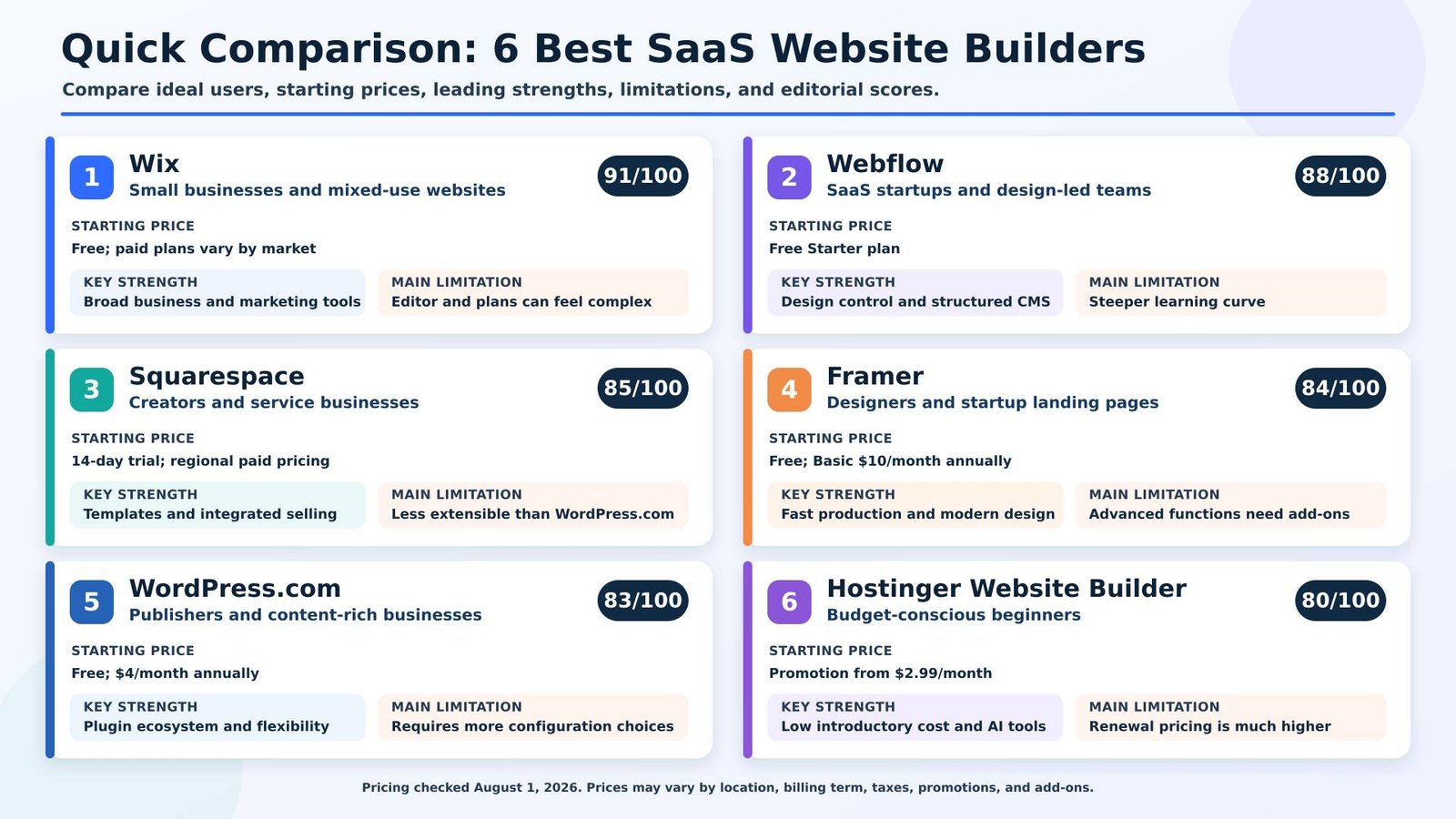
*Prices displayed on August 1, 2026. Taxes, billing periods, promotions, currencies, regional availability, ecommerce functions, seats, domains, and add-ons can change the final cost.
Table of Contents
- Editorial disclosure
- Why trust this comparison?
- What is a SaaS website builder?
- How the builders were selected
- Detailed product reviews
- Full feature comparison
- Best builder by use case
- Pricing comparison
- Questions to ask before choosing
- Common mistakes and warning signs
- Final recommendations
- Frequently asked questions
Editorial Disclosure
This comparison was created through desk research. The platforms were not personally tested for this article, and no private performance data or unpublished product access was used.
No information about affiliate relationships or paid placements was supplied when this draft was prepared. Before publication, the publisher should replace this statement with its actual commercial disclosure. If affiliate links are added, they should not influence the methodology, scores, or conclusions.
Companies were assessed using the same weighted criteria. Scores represent an editorial assessment based on verified product capabilities available on August 1, 2026. They are not laboratory test results. Promotional prices and feature limits can change after publication.
Why Trust This Comparison?
This comparison prioritizes official pricing pages, product documentation, feature pages, integration information, and support resources. Independent reviews may help identify recurring usability concerns, but official documentation takes priority for plan limits, pricing, and feature availability.
Each builder was examined across the same seven areas:
- Usability for its intended audience
- Design and customization controls
- Suitability for SaaS companies and startups
- Technical and on-page SEO capabilities
- Integrations and automation options
- Pricing relative to included functionality
- Performance, hosting, and growth potential
The article should be reviewed quarterly. Pricing, AI allowances, CMS limits, ecommerce fees, editor seats, and plan names require particular attention because providers change them regularly.
What Is a SaaS Website Builder?
A SaaS website builder is a cloud-hosted platform that lets users create, publish, and manage websites through a subscription service.
A SaaS website builder is a cloud-hosted platform that lets users create, publish, and manage websites through a subscription service. Unlike traditional software development, users do not need to write code or manage complex infrastructure to build a professional website.
How SaaS website builders work
The typical process involves choosing a template or generating an initial design with AI, editing the pages visually, connecting a domain, configuring SEO and analytics, and publishing the website through the provider’s hosting infrastructure.
Many platforms also include:
- Content management systems
- Forms and lead capture
- Ecommerce tools
- Appointment scheduling
- Marketing automation
- Analytics
- Third-party integrations
- AI-generated layouts, images, or copy
Who needs one?
SaaS website builders are suitable for founders, small businesses, creators, freelancers, marketers, and teams that want to launch without managing servers or building an entire site from code.
They are especially useful when launch speed, predictable maintenance, and ease of editing matter more than complete control over the underlying infrastructure.
Benefits
The main benefits are managed hosting, reduced maintenance, faster deployment, visual editing, integrated security, and access to support. Several builders also let marketers update landing pages without waiting for a developer.
Limitations
The main limitations are platform dependency, recurring fees, plan-based feature restrictions, and potentially difficult migrations. Some proprietary layouts, CMS structures, ecommerce data, and applications cannot be transferred cleanly to another provider.
How We Selected These Website Builders
Platforms were included when they provided:
- Cloud-based website creation and hosting
- A visual or no-code editing experience
- Custom-domain support
- Business-ready templates
- SEO controls
- A credible route from a basic site to a growing business website
- Active product documentation
- Transparent public pricing or a clearly identified custom plan
Shopify was excluded because its primary role is ecommerce rather than general business, creator, or SaaS website production. Duda remains a credible agency-oriented platform but was excluded to keep the final selection balanced across startups, creators, publishers, designers, and small businesses.
Scoring methodology
| Criterion | Weight | What a high score means |
| Ease of use | 20% | A suitable user can create, edit, and publish efficiently |
| Design flexibility | 20% | Strong control over layout, responsiveness, branding, and components |
| SaaS/startup suitability | 15% | Effective for product pages, landing pages, CMS content, and growth teams |
| SEO capabilities | 15% | Useful control over metadata, indexing, redirects, structured content, and performance |
| Integrations and automation | 10% | Strong native tools, app connections, APIs, or automation options |
| Pricing value | 10% | Capabilities are competitive relative to total ownership cost |
| Performance and scalability | 10% | Hosting, collaboration, content, and traffic options can support growth |
A lower score does not necessarily indicate a poor product. It may show that the platform targets a narrower audience, has stricter limits, or requires additional spending for advanced needs.
Detailed Reviews
1. Wix — Best Overall for Small Businesses
Overview
Wix is a hosted website and business-management platform aimed at entrepreneurs, creators, ecommerce sellers, and organizations. It combines visual website creation with hosting, forms, scheduling, payments, ecommerce, analytics, marketing, and an application marketplace.
Its breadth makes it the most balanced choice in this comparison. It can support a simple brochure site, service business, online store, portfolio, or early-stage startup website without requiring multiple external systems.
Key Features
Wix provides professionally designed templates, drag-and-drop editing, AI-assisted website creation, built-in hosting, CMS functions, SEO settings, analytics, business applications, and third-party integrations.
Higher plans expand storage, ecommerce, marketing, collaboration, developer, and analytics capabilities. The platform also offers Wix Studio for agencies and advanced teams.
Pricing
Wix has a free plan using Wix branding and a Wix subdomain. A custom domain and removal of Wix branding require a paid plan.
The official page displayed geographically localized annual pricing during research. Wix states that prices and currencies vary by location and that annual subscriptions are paid in full. The company also offers a 14-day refund period for an initial Premium upgrade and a one-year domain voucher with most annual or multi-year plans. Wix pricing and billing information
Possible extra costs include:
- Domain renewal after the introductory year
- Business email
- Paid applications
- Higher ecommerce plans
- Advanced marketing functions
- Enterprise services
Pros
- Broad selection of business tools
- Accessible to users without technical experience
- AI-assisted setup and content tools
- Ecommerce and appointment functions
- Large integration marketplace
- Managed hosting and customer support
Cons
- The number of editors and product options can be confusing
- Advanced applications may increase monthly costs
- Moving a complex Wix website elsewhere can require rebuilding
- Designers may prefer Webflow or Framer for precise layout control
Best For
Wix is best for small businesses, consultants, service providers, entrepreneurs, and teams that want website creation and business functions in one environment.
Consider an Alternative If
Choose Webflow when structured CMS content and front-end control are more important. Choose Framer for a highly visual startup marketing site. Consider WordPress.com when plugin-based expansion or publishing flexibility is the priority.
Evidence Reviewed
- Official Wix pricing page
- Wix Premium plan documentation
- Wix AI and website-builder pages
- Wix hosting, SEO, ecommerce, and application information
Editor Verdict
Wix ranks first because it offers the most complete balance of usability, business functionality, integrations, and growth options. Its greatest advantage is breadth: many organizations can manage their website, leads, bookings, content, and sales without assembling a separate technology stack. Its main weakness is complexity created by that breadth. It is the strongest general recommendation, but not an automatic winner for highly customized SaaS marketing sites.
Rating
| Category | Score |
| Ease of use | 19/20 |
| Design flexibility | 17/20 |
| SaaS/startup suitability | 13/15 |
| SEO capabilities | 14/15 |
| Integrations and automation | 10/10 |
| Pricing value | 9/10 |
| Performance and scalability | 9/10 |
| Overall | 91/100 |
Evidence date: August 1, 2026
2. Webflow — Best for SaaS Startups
Overview
Webflow is a visual development and hosting platform designed for professional websites. It gives designers and marketing teams greater control over layout, responsive behavior, CMS structures, reusable components, and front-end presentation than most beginner-focused builders.
This combination is particularly useful for SaaS companies that publish feature pages, integrations, customer stories, landing pages, comparison pages, and educational content.
Key Features
Webflow includes visual HTML and CSS-oriented design controls, reusable components, CMS collections, managed hosting, forms, SEO settings, redirects, custom code options, collaboration, and localization-related capabilities.
Every website exists within a Workspace. A Site plan is required to publish on a custom domain, while a paid Workspace may be needed for additional staging or team capabilities. Webflow confirms that Site and Workspace plans are billed separately. Webflow plan documentation
Pricing
Webflow offers a free Starter Site plan and free Workspace access with limits. Paid Site plans unlock custom-domain publishing and additional website functions.
Webflow changed its plan structure in May 2026, including consolidating content-oriented plans into a Premium Site plan. Buyers should verify the final Site plan, Workspace, seat, localization, ecommerce, and optimization costs at checkout. Webflow 2026 pricing update
Pros
- Extensive visual design control
- Strong structured CMS
- Suitable for sophisticated SaaS marketing sites
- Managed hosting
- Reusable design system capabilities
- Useful collaboration and staging options
Cons
- Steeper learning curve than Wix or Squarespace
- Site, Workspace, seat, and add-on pricing can be difficult to calculate
- Ecommerce is not its strongest use case
- Advanced implementation may require specialist knowledge
Best For
Webflow is best for SaaS companies, startups, design-led marketing teams, and agencies that need a scalable marketing site without maintaining a conventional development stack.
Consider an Alternative If
Choose Wix if a non-technical owner wants easier business management. Choose Framer if fast landing-page production matters more than advanced CMS architecture. Choose WordPress.com for plugin-heavy publishing requirements.
Evidence Reviewed
- Webflow official pricing
- Site plan documentation
- 2026 pricing update
- Hosting and CMS feature pages
- Workspace and collaboration information
Editor Verdict
Webflow earns second place because it combines advanced design control with a capable CMS and managed hosting. It is arguably the strongest website builder for SaaS companies with experienced designers or marketing operations support. Its main limitation is operational complexity: plans, Workspaces, seats, and add-ons require careful budgeting. It can outperform Wix for specialized startup sites, but it is less accessible to beginners.
Rating
| Category | Score |
| Ease of use | 15/20 |
| Design flexibility | 20/20 |
| SaaS/startup suitability | 15/15 |
| SEO capabilities | 14/15 |
| Integrations and automation | 9/10 |
| Pricing value | 7/10 |
| Performance and scalability | 8/10 |
| Overall | 88/100 |
Evidence date: August 1, 2026
3. Squarespace — Best for Creators and Service Businesses
Overview
Squarespace is an all-in-one website platform known for visually consistent templates, portfolios, blogging, services, appointment-related tools, digital products, and ecommerce.
It works particularly well for creators who need a polished website without making numerous technical or design decisions.
Key Features
Squarespace offers responsive templates, visual editing, managed cloud hosting, analytics, ecommerce, content and membership options, invoicing, scheduling integrations, SEO settings, and AI-assisted creation.
All current paid website plans allow some form of selling, although commerce features, limits, and transaction terms vary by plan.
Pricing
Squarespace offers monthly and annual subscriptions. There is no permanent free plan, but every website starts with a 14-day trial without requiring a credit card. Annual plans cost less on an average monthly basis and include a custom domain for the first year. Hosting is included. Squarespace pricing information
Pricing may vary by country, currency, tax treatment, and plan availability. Additional costs can include email campaigns, scheduling, domains, transaction fees, and higher commerce functionality.
Pros
- Polished, cohesive templates
- Strong fit for portfolios and service providers
- Accessible editing experience
- Managed hosting
- Integrated selling and creator tools
- Good presentation without extensive customization
Cons
- No permanent free plan
- Smaller extension ecosystem than WordPress.com
- Less granular design control than Webflow or Framer
- Advanced commerce or scheduling needs may raise costs
Best For
Squarespace is best for photographers, writers, consultants, artists, coaches, restaurants, and service businesses that prioritize presentation and straightforward management.
Consider an Alternative If
Select Webflow or Framer when precise design control is essential. Choose WordPress.com when extensive plugin support is required. Wix may be better for businesses that need a wider range of native operational tools.
Editor Verdict
Squarespace ranks third because it creates a strong balance between visual quality and usability. Its templates and integrated creator tools reduce the effort required to produce a professional website. The central limitation is extensibility: businesses with unusual workflows may eventually need capabilities outside its ecosystem. It is a convincing choice for creators and service providers, but less suitable for complex SaaS content architecture.
Rating
| Category | Score |
| Ease of use | 18/20 |
| Design flexibility | 17/20 |
| SaaS/startup suitability | 11/15 |
| SEO capabilities | 13/15 |
| Integrations and automation | 8/10 |
| Pricing value | 9/10 |
| Performance and scalability | 9/10 |
| Overall | 85/100 |
Evidence date: August 1, 2026
4. Framer — Best for Designers and Startup Landing Pages
Overview
Framer is a no-code website builder focused on visual design, rapid production, AI-assisted creation, landing pages, and collaborative marketing websites.
It is especially attractive to startup founders and designers who want contemporary layouts without converting every design manually into production code.
Key Features
Framer provides a free-form visual canvas, responsive layouts, CMS collections, AI generation, SEO controls, analytics, hosting, collaboration, redirects, staging, branching, and optional localization and conversion tools.
The current Basic plan includes two CMS collections, 50 GB of bandwidth, built-in SEO, and custom-domain support. Pro adds more CMS capacity, redirects, staging, and branching. Framer pricing
Pricing
Framer offers a free plan for experimentation and non-commercial projects.
With annual billing:
- Basic: $10 per month
- Pro: $30 per month
- Enterprise: Custom pricing
Additional design editors cost $20 each per month, while content editors cost $10 each. Localization, A/B testing, and advanced hosting can create substantial extra costs.
Pros
- Excellent visual design experience
- Fast production of startup landing pages
- AI-assisted, editable page generation
- CMS and managed hosting
- Modern collaboration workflow
- Strong responsive design controls
Cons
- Advanced add-ons can be expensive
- Basic plan has restricted CMS capacity
- Less suitable for complex ecommerce
- Large content operations may prefer Webflow or WordPress.com
Best For
Framer is best for startup landing pages, portfolios, product launches, designers, and marketing teams that value design speed and visual impact.
Consider an Alternative If
Use Webflow for more complex CMS structures. Choose Wix for operational business features or WordPress.com for content-heavy expansion. Consider Squarespace when template-led simplicity is preferable to free-form design.
Editor Verdict
Framer ranks fourth, but it may be the best website builder for startups that need a polished marketing site quickly. Its design environment, AI tools, and collaboration features support rapid iteration. Its biggest drawback is that CMS, localization, testing, hosting, and additional editors can increase the total cost. It is strongest for focused marketing sites rather than complex business operations.
Rating
| Category | Score |
| Ease of use | 17/20 |
| Design flexibility | 19/20 |
| SaaS/startup suitability | 14/15 |
| SEO capabilities | 13/15 |
| Integrations and automation | 7/10 |
| Pricing value | 7/10 |
| Performance and scalability | 7/10 |
| Overall | 84/100 |
Evidence date: August 1, 2026
5. WordPress.com — Best for Content-Led Expansion
Overview
WordPress.com is the hosted SaaS version of WordPress. It manages hosting, security, software updates, and backups while giving customers access to WordPress themes, blocks, and plugins.
It should not be confused with WordPress.org, which requires separately purchased hosting and greater technical responsibility.
Key Features
WordPress.com provides themes, a block editor, AI-guided site creation, built-in statistics, SEO foundations, content management, payments, managed hosting, and access to more than 50,000 plugins on paid plans.
Its plugin access provides greater functional flexibility than closed website builders. However, selecting and maintaining a coherent combination of themes and plugins requires more judgment.
Pricing
WordPress.com has a permanent free plan with a WordPress.com subdomain and basic limits.
Paid plans started at:
- $2.75 per month when billed for three years
- $4 per month when billed annually
Paid plans include plugin installation, a domain for the first year on eligible billing terms, managed hosting, malware protection, and removal of visitor-facing advertisements. WordPress.com pricing
Real-time backups and one-click restoration are limited to higher plans. Premium plugins, themes, ecommerce extensions, professional email, and future domain renewals may cost extra.
Pros
- Excellent content management
- Large plugin and theme ecosystem
- Strong portability within the WordPress ecosystem
- Managed hosting and security
- Suitable for blogs and publications
- Significant long-term expansion potential
Cons
- More configuration decisions than simpler builders
- Plugin quality and costs vary
- Visual design can depend heavily on the chosen theme or tools
- Long-term promotional billing requires a larger upfront commitment
Best For
WordPress.com is best for publishers, blogs, educational sites, membership projects, and businesses expecting content or functionality to expand substantially.
Consider an Alternative If
Choose Squarespace when design consistency and simplicity are more important. Use Framer for a focused startup landing page or Webflow for a custom design system and structured SaaS CMS.
Editor Verdict
WordPress.com ranks fifth because its content management and plugin ecosystem provide exceptional expansion potential. It is the strongest alternative for businesses that expect their website to develop beyond a standard page builder. Its main limitation is the additional decision-making involved in themes, plugins, compatibility, and design. It offers flexibility, but not always the most streamlined no-code experience.
Rating
| Category | Score |
| Ease of use | 15/20 |
| Design flexibility | 16/20 |
| SaaS/startup suitability | 11/15 |
| SEO capabilities | 14/15 |
| Integrations and automation | 10/10 |
| Pricing value | 9/10 |
| Performance and scalability | 8/10 |
| Overall | 83/100 |
Evidence date: August 1, 2026
6. Hostinger Website Builder — Best Introductory Value
Overview
Hostinger Website Builder is a visual no-code platform included within Hostinger’s website packages. It targets beginners, creators, small brands, and businesses that want an inexpensive route to a hosted website.
The platform includes a drag-and-drop editor, templates, marketing functions, AI creation tools, and ecommerce on qualifying plans.
Key Features
Hostinger advertises more than 300 templates, managed hosting, mobile editing, AI writing and image tools, an AI SEO assistant, email marketing, ecommerce, analytics, and domain-related benefits.
Its SEO settings support page titles, meta descriptions, URLs, alt text, index controls, and AI-generated recommendations. Hostinger SEO documentation
Pricing
Promotional pricing checked on August 1, 2026 included:
- Premium Website Builder: $2.99 per month for 48 months, paid upfront; renewal listed at $10.99 per month
- Business Website Builder: $3.79 per month for 48 months, paid upfront; renewal listed at $16.99 per month
The Business plan included ecommerce and expanded AI tools. All advertised monthly prices represented the total prepaid term divided by the number of months. Hostinger Website Builder pricing
Pros
- Low introductory cost
- Beginner-friendly drag-and-drop editor
- AI writing, image, and SEO tools
- Hosting and domain-related benefits
- Ecommerce on the Business plan
- 30-day money-back guarantee
Cons
- Promotional price requires a long prepaid term
- Renewal rates are considerably higher
- Less advanced CMS functionality
- Smaller integration environment than Wix or WordPress.com
- Less design control than Webflow or Framer
Best For
Hostinger Website Builder is best for freelancers, first-time site owners, small brands, and budget-conscious businesses with straightforward website requirements.
Consider an Alternative If
Use Webflow or WordPress.com for a content-heavy site. Choose Wix when business applications and integrations are important. Select Framer when design quality and landing-page iteration matter more than initial cost.
Editor Verdict
Hostinger ranks sixth because it offers strong introductory value and a practical collection of AI tools. It is an accessible starting point for a simple business website, portfolio, or small store. Its central limitation is the gap between promotional and renewal pricing, combined with less advanced CMS and integration capabilities. Buyers should compare the full renewal cost, not only the discounted monthly figure.
Rating
| Category | Score |
| Ease of use | 18/20 |
| Design flexibility | 14/20 |
| SaaS/startup suitability | 10/15 |
| SEO capabilities | 12/15 |
| Integrations and automation | 6/10 |
| Pricing value | 10/10 |
| Performance and scalability | 10/10 |
| Overall | 80/100 |
Evidence date: August 1, 2026
Full SaaS Website Builder Comparison
| Platform | Best for | Starting price* | Key strength | Score |
|---|---|---|---|---|
| Wix | Small businesses | Free; paid plans vary | Business and marketing tools | 91/100 |
| Webflow | SaaS startups | Free Starter plan | Design control and CMS | 88/100 |
| Squarespace | Creators | 14-day free trial | Templates and selling tools | 85/100 |
| Framer | Designers | Free; Basic $10/month | Fast, modern website design | 84/100 |
| WordPress.com | Content-rich sites | Free; paid from $4/month | Plugins and CMS flexibility | 83/100 |
| Hostinger | Budget-conscious beginners | Promotional price from $2.99/month | Value and AI tools | 80/100 |
Best SaaS Website Builder by Use Case
Startups
Webflow is the best option for SaaS startups that need a scalable marketing site. Its design system, CMS collections, landing pages, custom code options, and collaboration features support growing marketing operations.
Framer is the better alternative when launch speed and visual experimentation are more important than complex content architecture.
Small Businesses
Wix is the strongest small-business choice. It combines website creation with scheduling, forms, payments, ecommerce, marketing, analytics, and an application marketplace.
Hostinger is suitable when requirements are simple and introductory cost is the main concern.
Creators
Squarespace is the best option for creators who want polished design with minimal setup. It supports portfolios, blogging, services, memberships, products, and other creator-focused formats.
WordPress.com is better for creators planning a large content library or extensive plugin-based functions.
Agencies
Webflow is the strongest choice for design-led agencies, while Wix Studio may suit agencies building broader business websites for smaller clients. Agencies should calculate Workspace, editor, client handoff, and hosting costs before standardizing on a platform.
Enterprise Teams
Webflow, Wix Enterprise, WordPress VIP, Framer Enterprise, and Squarespace Enterprise-type arrangements can serve larger organizations, but requirements should be assessed individually. Procurement teams should examine security documentation, SSO, permissions, service commitments, localization, accessibility, governance, and data-processing terms.
Non-Technical Users
Wix and Squarespace are the easiest recommendations for non-technical users. Hostinger is another accessible option for simpler projects. Webflow and WordPress.com may require more learning when advanced functions are introduced.
Pricing Comparison: What Will the Website Really Cost?
Website-builder prices rarely represent the complete cost of ownership.
Subscription models
Providers commonly offer monthly, annual, multi-year, or custom subscriptions. Annual and multi-year terms usually reduce the advertised monthly equivalent but require upfront payment.
Hidden and overlooked costs
Potential additional costs include:
- Domain renewal
- Business email
- Premium templates
- Applications or plugins
- Additional editors
- Ecommerce processing or transaction fees
- Localization
- Advanced analytics
- A/B testing
- Increased bandwidth or CMS limits
- Appointment scheduling
- Email marketing
- Migration assistance
Hosting fees
Hosting is included with all six services reviewed. However, higher traffic, advanced deployment, additional websites, or specialized hosting functions may require a higher plan or add-on.
Renewal pricing
Promotional prices should never be compared directly with standard prices without identifying the contract length. Hostinger’s discounted four-year offers, for example, renewed at materially higher rates on the date checked.
Create a three-year cost estimate before selecting a platform. Include the initial term, renewal, domain, email, required applications, seats, and ecommerce fees.
10 Questions Before Choosing a SaaS Website Builder
- What is the website’s primary goal: leads, sales, publishing, bookings, membership, or portfolio presentation?
- Who will design and maintain the site after launch?
- How many landing pages and CMS items will be required?
- Can the platform support the expected content structure?
- Which CRM, analytics, email, payment, and automation tools must connect?
- Are redirects, canonical controls, structured data, and metadata accessible?
- How much will the platform cost after promotional pricing ends?
- Can content, products, contacts, and media be exported?
- What happens when traffic, team size, bandwidth, or localization needs increase?
- Would migration require rebuilding the website from the beginning?
Common Mistakes and Warning Signs
Choosing Based Only on Templates
An attractive template does not confirm that the platform supports the required CMS, integrations, lead flows, analytics, or ecommerce functions. Evaluate the operating requirements before visual appearance.
Ignoring Scalability
Check page limits, CMS items, bandwidth, storage, editors, localization, form submissions, ecommerce products, and automation allowances. A low-cost plan may become unsuitable quickly.
Underestimating Migration Difficulty
Proprietary builders do not always export complete layouts and functions. Ask what can be exported and how redirects, metadata, images, customer records, and structured content will be preserved.
Focusing Only on Introductory Price
A large discount can hide a long prepaid commitment or expensive renewal. Compare the full cost over at least three years.
Assuming Every Integration Is Native
An integration may require a paid application, middleware service, custom code, or higher plan. Verify the exact workflow instead of relying on an integration logo.
Treating AI Output as Finished Content
AI website builders can accelerate drafting, but generated claims, images, metadata, and copy still require human review. AI assistance does not guarantee originality, accessibility, conversion performance, or search visibility.
Final Recommendations
There is no universal winner among the best SaaS website builders.
Wix is the best overall option for businesses that want strong usability and a broad native toolset. Webflow is the best startup option for design-led SaaS marketing sites and structured content. Squarespace is the strongest creator choice, particularly when polished presentation matters.
Hostinger provides the best introductory value, but buyers must account for renewal pricing. Framer is the best option for designers and rapid landing-page production. WordPress.com is the best alternative for publishing and plugin-based expansion.
Before committing, create a shortlist of two platforms and build the same representative page in each. Test the CMS, mobile editor, form workflow, integrations, metadata, collaboration, and export options. Compare the full three-year cost before selecting a plan.
FAQs
What is the best SaaS website builder overall?
Wix is the best overall SaaS website builder for the widest range of small-business requirements. It combines accessible editing, managed hosting, ecommerce, scheduling, marketing, analytics, and integrations. Webflow can be a better choice for design-led SaaS companies, while Squarespace is more suitable for creators. The right choice depends on the website’s purpose and management requirements.
What is the best website builder for SaaS companies?
Webflow is the strongest website builder for many SaaS companies because it supports flexible design, structured CMS content, landing pages, and marketing-team workflows. Framer is a compelling alternative for startups that prioritize rapid visual iteration. Wix may be more appropriate when the company also needs integrated appointments, customer management, ecommerce, or other operational tools.
Can I build a SaaS website without coding?
Yes, all six platforms in this comparison support no-code or visual website creation. Wix, Squarespace, and Hostinger are particularly accessible to beginners. Framer and Webflow also provide visual editing but reward a stronger understanding of responsive design and website structure. Custom code may still be useful for specialized integrations or advanced product demonstrations.
Which website builder is best for creators?
Squarespace is the best general website builder for creators who want polished templates, portfolio presentation, blogging, services, and selling tools in one platform. WordPress.com is better for extensive publishing or plugin-based features. Framer is suitable for design-focused portfolios, while Wix works well for creators who need bookings, events, ecommerce, or marketing applications.
Which SaaS website builder has the best SEO features?
Webflow and WordPress.com provide the strongest SEO flexibility for advanced requirements, while Wix offers an excellent balance of capability and usability. SEO success still depends on content quality, site architecture, internal linking, accessibility, authority, and technical implementation. No website builder can guarantee rankings, AI Overview inclusion, or visibility in ChatGPT and other AI systems.
Is an AI website builder suitable for a business?
An AI website builder can be suitable for a business when its output is treated as a starting point rather than a finished website. AI can generate layouts, page structures, images, and draft copy, but a person should verify factual claims, branding, legal information, accessibility, search intent, mobile presentation, and conversion paths before publication.
Is WordPress.com a SaaS website builder?
Yes, WordPress.com is a hosted SaaS website platform. It bundles WordPress software with hosting, security, updates, support, and subscription plans. This differs from WordPress.org, where users obtain hosting separately and manage more of the technical environment themselves. WordPress.com paid plans also support third-party plugins, giving it significant expansion potential.
Are free website-builder plans suitable for businesses?
Free plans are usually suitable for evaluation, prototypes, or temporary projects rather than an established business website. They may use a provider subdomain, display platform branding, restrict storage, and exclude advanced functions. A paid plan is generally required for a custom domain, professional presentation, additional SEO controls, ecommerce, or meaningful collaboration.
Can I move a website to another builder later?
A website can usually be moved, but the complete design may not transfer automatically. Text, images, products, posts, or customer data may be exportable, while layouts, applications, animations, and CMS relationships may need to be rebuilt. Check export options and prepare a redirect plan before selecting a proprietary platform.
How much should a business budget for a SaaS website builder?
A small business should budget for more than the advertised website subscription. Include the domain, business email, applications, premium templates, ecommerce fees, marketing tools, additional users, and renewal pricing. A straightforward site may remain inexpensive, while a growing marketing or ecommerce operation can require a substantially higher monthly investment.